How to Track Business Income and Expenses in Excel (No Software Needed)
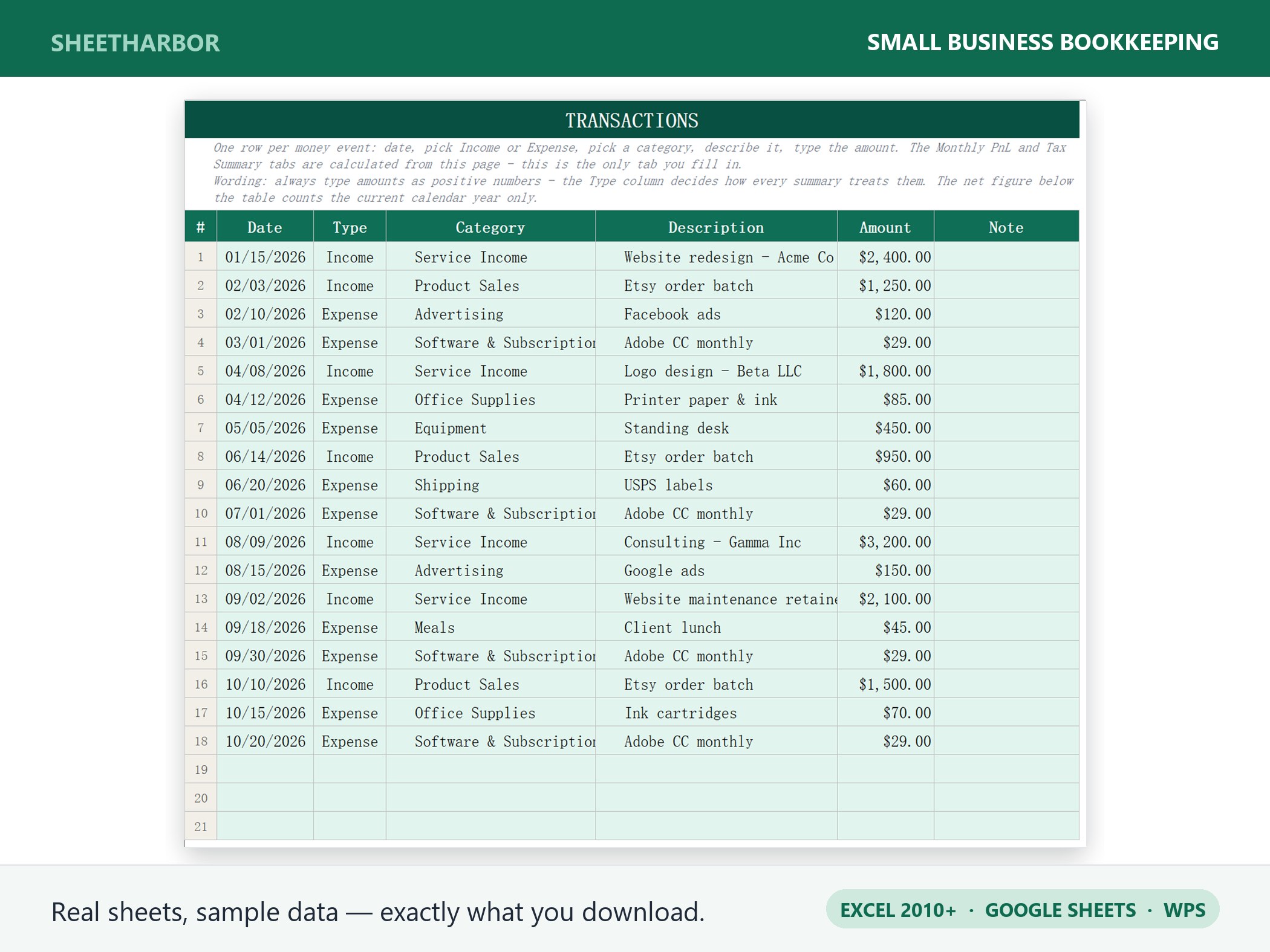
Most small businesses don't fail because they can't sell. They fail because they don't know their numbers. Money comes in, money goes out, and somewhere between a shoebox of receipts and a bank app with 400 transactions, the actual picture disappears.
You don't need $40/month accounting software to fix this. You need five columns, one weekly habit, and about fifteen minutes a month. Here is the exact setup we use and recommend.
Why a spreadsheet still beats an app for solo operators
Accounting apps are built for businesses with bookkeepers, payroll and inventory. If you're a freelancer, a one-person shop, an Etsy seller or a contractor, most of what you pay for goes unused — while the parts you actually need (knowing what you earned, what you spent, and what you owe in tax) are buried three menus deep.
A spreadsheet wins on four counts:
- You own the data. No export limits, no plan downgrades, no "your trial has ended" with your history locked inside.
- It works offline and forever. Excel from 2010 still opens a 2026 file.
- You can see the logic. Every number is a cell you can click, not a black box.
- It costs nothing. The file is the software.
The tradeoff is discipline: a spreadsheet does not nag you. That's why the design below is built around one row per transaction — the smallest possible unit of work.
The five columns that do all the work
Open a blank sheet and create exactly these headers in row 1:
| Date | Description | Category | Amount | Type |
|---|---|---|---|---|
| 2026-11-03 | Invoice #1042 — Acme Co | Client income | 1850.00 | Income |
| 2026-11-03 | Adobe subscription | Software | 22.99 | Expense |
| 2026-11-04 | Fuel — client site visit | Travel | 41.20 | Expense |
Rules that matter more than the layout:
- One row per transaction, never one row per day. If you bought three things at the hardware store, that's three rows (or one row split into the right categories). Daily lump sums are the reason reports lie.
- Amount is always positive. The
Typecolumn tells you direction. This lets every summary formula use the sameSUMIFSlogic instead of fighting with minus signs. - Date is a real date, formatted
YYYY-MM-DD. Text dates break every sort and every month filter later. - Descriptions are for your future self. "Card payment" tells you nothing in March. Write the vendor and the purpose.
Categories: build them to match your tax return
The single biggest time-saver is choosing categories that map 1:1 to the deduction lines on your tax return. Then tax season becomes a copy job, not an archaeology project.
A workable starter set for most solo businesses:
- Client income
- Product sales
- Other income
- Advertising & marketing
- Software & subscriptions
- Contractors & subcontractors
- Equipment (over your local capitalization threshold)
- Supplies
- Travel
- Meals (usually partially deductible — check your jurisdiction)
- Vehicle & fuel
- Insurance
- Professional fees (accountant, legal)
- Rent & utilities (or home office allocation)
- Bank & payment fees
- Education & training
- Taxes & licenses
Put this list on a second tab and use Data → Data Validation to turn the Category column into a dropdown. It takes two minutes and eliminates the "software", "Software", "SOFTWARE " triple-category problem forever.
The formulas (copy these)
Assume your transactions live on a sheet called Transactions, with data in rows 2 to 5000, and your category list sits on a Lists tab.
Total income for a month (say November 2026):
=SUMIFS(Transactions!D:D, Transactions!E:E, "Income",
        Transactions!A:A, ">="&DATE(2026,11,1),
        Transactions!A:A, "<="&DATE(2026,11,30))
Total expenses for the same month — same formula, "Expense" instead of "Income".
Profit = income − expenses. Nothing more complicated than that.
Spend by category, with the category name in cell A2 of your summary tab:
=SUMIFS(Transactions!D:D, Transactions!C:C, A2, Transactions!E:E, "Expense")SUMIFS works in Excel 2007 and later, in Google Sheets, in WPS and in LibreOffice. You don't need SUMIF, arrays, or anything with a _xlfn. prefix. If a formula you find online starts with XLOOKUP or TEXTJOIN, skip it — half your customers' machines can't open it.
The monthly close: fifteen minutes, once a month
This routine is what keeps the file trustworthy:
- Reconcile. Open your bank and card statements. Tick every transaction against a row. Anything unticked is either missing from the sheet or missing from the bank — both are worth knowing.
- Categorize the leftovers. Anything with a blank or "Uncategorized" category gets fixed now, while you still remember the purchase.
- Check the month's totals against last month. A category that doubled is either a real change or a data entry error. Both deserve a look.
- File the paper. Photograph receipts into one folder named
YYYY-MM. Paper fades; photos don't.
Do this on the same day each month — the 1st works well, because your statements have just closed.
What to hand your accountant (or your tax software)
At year end, you need exactly four things, and a clean spreadsheet produces all of them in about ten minutes:
- Total income by month and by client
- Total expenses by category
- A transaction list sorted by date, with descriptions
- Receipt images organized by month
If you're filing yourself, the category totals go straight into the relevant boxes. If you use an accountant, this package typically cuts their billable hours — and their questions.
Five mistakes that quietly ruin the file
- Mixing personal and business spending in one sheet. Use a second
Typevalue (Personal) or a separate file. Never let them blur. - Recording revenue when invoiced instead of when paid (or the reverse). Pick one method, note it at the top of the sheet, and stay consistent.
- Deleting rows instead of marking them void. Deleting breaks reconciliation history. Add a
Statuscolumn withVoidand filter it out of reports. - Storing the file only on your laptop. One spilled coffee, no business records. Keep a dated copy in cloud storage each month.
- Starting in April. Bookkeeping done monthly is 15 minutes. Done in April, it is 40 hours.
A faster starting point
If you'd rather not build the formulas, dropdowns and reports yourself, our Small Business Bookkeeping template ships with this exact structure: a transaction log, an automatic monthly P&L, a tax summary by category, and a Lists tab you can edit to match your own chart of accounts. It works in Excel 2010+, Google Sheets and WPS, and it's a one-time $29 — no subscription, no account to create.
Whichever route you take, start with one row per transaction. Everything else in bookkeeping is downstream of that single habit.
Ready-made version: Small Business Bookkeeping ships as a one-time $29 download — Excel, Google Sheets and WPS, with the reports already built.
See the template →